If you’ve been following along as I share how I rebuilt my website with AI, you might be wondering whether you could do the same. Maybe you’re excited, maybe you’re nervous, or maybe it all sounds a little too good to be true.
So here are honest answers to the questions you might have, including the times when rebuilding your own website isn’t the right move.
Do I need to know how to code?
No. AI writes the code.
But “no coding” doesn’t mean “no technical steps”. You’ll install a couple of tools, copy a few commands into your computer’s terminal (the text window where you type instructions), look after your project files, and set up your hosting. If you can follow a recipe carefully, you can do this.
And you don’t need fancy prompts either. When I moved my own site, I told AI what I wanted in plain, simple words, then added more detail whenever it needed to know something. We don’t have to make everything complicated just because it’s AI.
In all honesty, for my own move I wrote down what I had in mind and AI did the steps for me. And I’m someone who taught myself to code at sixteen! I still enjoy the code. I just don’t have to write most of it any more.
What tools will I use?
- Claude Code, an AI tool that builds and edits your website’s files as you ask
- GitHub, a free place to keep your website’s files safe, with every change saved
- Cloudflare Pages, to host your finished website for free
- My free Website Prompt Generator, to write the brief for your new site
If you’d like to see how the tools fit together, I wrote about how I plan before I build.
What does it cost to run?
- Claude Code needs a paid Claude plan while you’re building.
- Cloudflare Pages has a free plan with 500 builds a month and up to 20,000 files per site. A small business website is unlikely to come anywhere near those.
- Your domain costs the same as it does now. It’s the part you keep.
- Extras like a form service, booking tool or online payments may have their own costs, though many form services have a free plan.
One thing to watch: not every free plan allows business use. Vercel’s free Hobby plan, for example, is for personal, non-commercial projects. I explain the options in how to host a static website with your own domain.
For a lot of people, the monthly cost ends up lower than their current hosting, plugins and theme. Add yours up and compare.
Here’s mine. At the start of this year, my site ran on WordPress at DreamHost for about $12 a month, with an Elementor theme I’d bought for around $50. Now? Hosting: none. Plugins: none. Themes: none. My domain is still a yearly cost, as it always was, and it should be: your domain is the part you keep.
Will this work for my website?
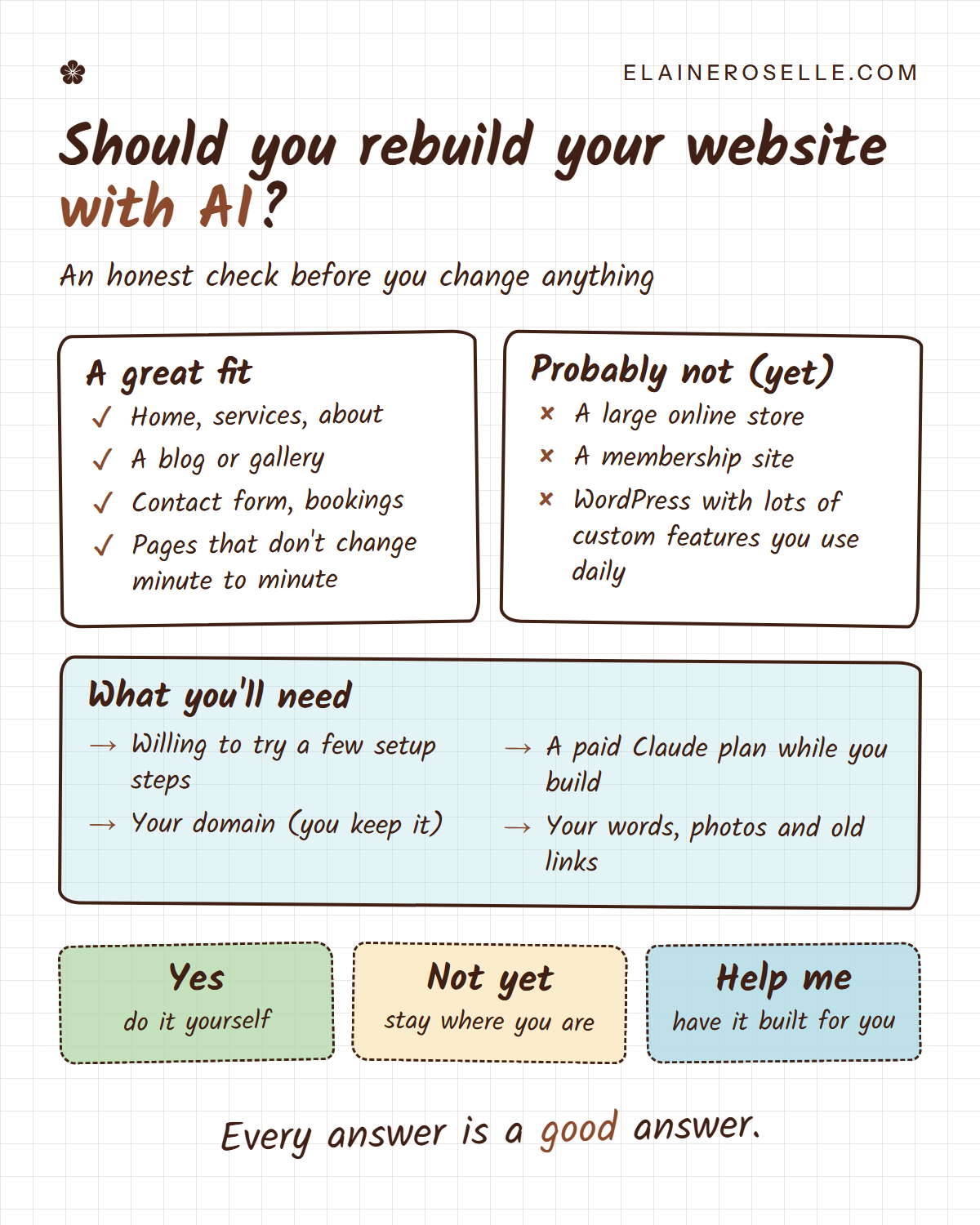
It’s a great fit for relatively simple business websites: your home page, services, about, blog, gallery, contact details and a contact form.
It’s probably not the right fit if you run:
- A large online store with lots of products
- A membership site with logins and paid content
- A WordPress setup with lots of custom features you rely on every day
If that’s you, it’s okay to stay where you are, or to get some help. I wrote more about when a static website is (and isn’t) right for you.
Will I lose my content or my Google rankings?
Not if you plan for it. The whole approach is about rebuilding, not starting over:
- You keep your words, photos and branding. Your keep list comes first.
- You redirect your old page addresses, so saved links and search results still work.
- You check what Google sees before you switch, including your sitemap, page titles and descriptions.
That last one caught me out. After my own move, every page was quietly telling Google my old domain was the real one. The site looked fine to a person. To Google, it was a forwarding address. It’s a five-minute check, and it’s built into the course so you don’t miss it like I did.
Any website move carries a little risk, so it’s worth taking these steps carefully. That’s exactly why they’re built into the process.
Will my email stop working when I switch?
It shouldn’t, as long as you bring your email settings with you. If your email uses your domain (like hello@yourbusiness.com), its settings live alongside your website’s, and they need to come along when you point your domain at your new host.
My simple rule: take a screenshot of your old settings before you change anything, so you can always undo it.
What if AI gets something wrong?
It will, sometimes. That’s normal.
That’s why you build in small steps and review each one before moving on. If something looks off, you say so, and AI fixes it. You’re always the one who decides what’s ready. Nothing goes live until you say yes.
Here’s an honest one from my own move. Some old posts still linked to images that never made the trip, and 346 of my posts had no short description, so nearly every blog card showed the same line. Little things, but a visitor notices. I only caught them because I checked, which is exactly why checking is part of every step.
What about my contact form?
A static site can still have one. You connect a form service (like Formspree, Web3Forms or Tally) and messages land in your inbox, with no server of your own to look after. Bookings and newsletter sign-ups work the same way, through tools built for the job.
Funnily enough, my own website doesn’t have a contact form any more. When it did, the only one filling it in was spam! I explain the options, and the checks I never skip, in how to add forms to a static website.
How long does it take?
It depends on your website and how much you want to change. The course itself is ten modules, one complete rebuild: Start Here, seven core modules and two bonus modules, with one short video lesson each. The rebuild takes longer than watching, because you’ll be making decisions about your own site along the way, but you can work at your own pace.
For what it’s worth, mine was a big one: twenty years of writing, nearly 350 posts, plus a podcast and videos. A small business website with a handful of pages is a much smaller job.
Will my website go down while I rebuild?
No. You build and test your new site on a free preview address first. Your current website stays live until you’re ready to switch your domain over.
You're always the one who decides what's ready.
Can I keep updating it myself afterwards?
Yes, and that’s one of my favourite parts. Once it’s built, you can ask AI to make changes the same way: a new page, an updated price, a fresh photo. You stay in control of your own website.
I like to think of mine as a digital garden. I keep planting seeds: a new page here, a free resource there, a small feature I’ve been wanting to try.
What if I’d rather not do it myself?
That’s completely fair. Not everyone wants to, and not everyone has the time. I build simple websites for small businesses too, with everything in your name, including connecting your domain.
Ready to rebuild yours?
If you’ve read this far and thought “I think I could do this”, you probably can.
My course, Rebuild Your Business Website With AI, walks you through one complete rebuild from start to finish: deciding if it’s right for you, preparing your site, planning and rebuilding with AI, checking every page, adding your forms, and publishing it on your own domain.
Doors are open now, so you can start whenever you’re ready.
Still got a question I didn’t answer? Reply by email or get in touch. I’d love to help you decide.
Still learning with you, little by little. 🤎
xo,
Elaine Roselle
This post was drafted with the help of AI from my planning notes and build history. It is carefully edited to fit my own voice.